En esta sección
Payment method CashDro
HioPOS Cloud allows integration with CashDro as a cash payment method.
CashDro is 'The till that always balances' and its main features are the following: it allows instant till closing without discrepancies, it is the most secure on the market in its segment, it works with one or several POS terminals, tablets or smartphones, it is easy to link and can be managed autonomously without being connected to a PC or POS terminal.
First, you will need to activate the 'CashDro Link' option in CloudLicense; for this, you must contact your distributor.
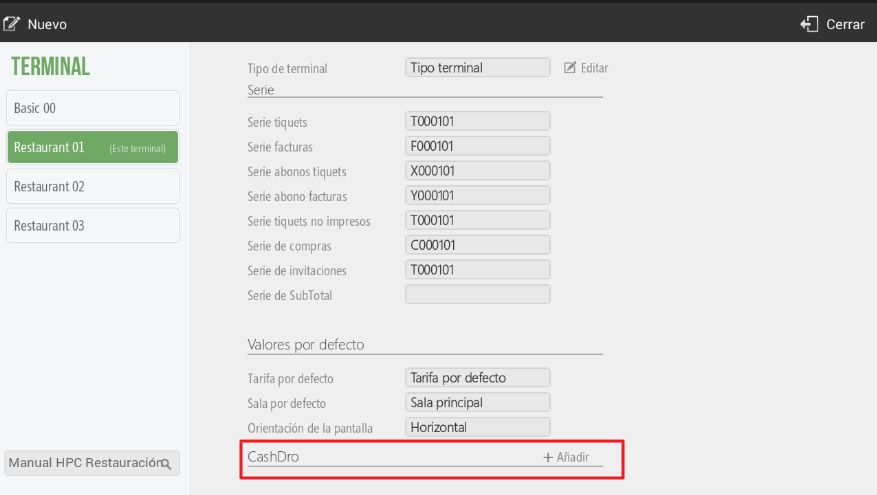
Next, to configure the HioPOS Cloud link with CashDro, we will select Configuration, Terminal and navigate to the bottom of the screen where the CashDro option appears.
To pair the device, we will select the add option.
On the configuration screen that will open, we will need to enter the IP address of the CashDro we want to link with, assign it a name, and provide the device's Username and Password. At this moment, a couple of dropdown menus will appear for the administrator terminal and the salesperson.
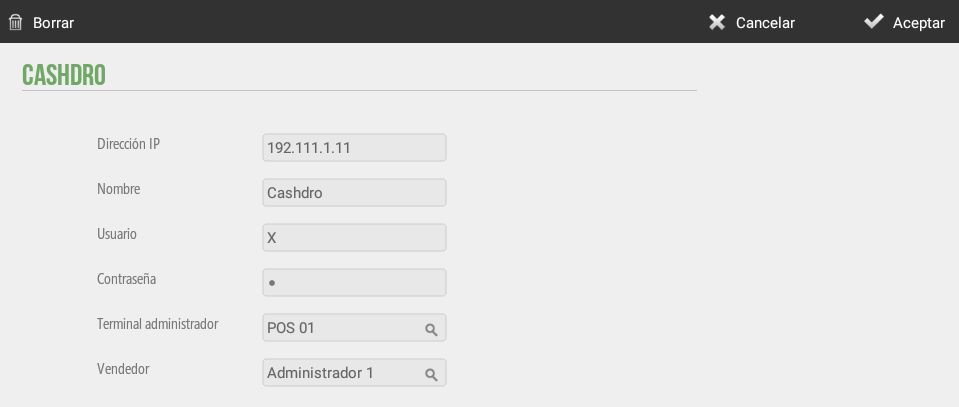
HioPOS Cloud, through its link with CashDro, allows us to record all cash movements made with the device and to account for them in the HioPOS Cloud terminal via Cash Control. If we want the cash inflows and outflows made with CashDro to have implications and be registered in HioPOS Cloud, we will link the administrator Terminal -For example; POS1- and the seller.
At this moment, the IP address will appear in the lower margin of the screen. Settings, Terminal previously seen.
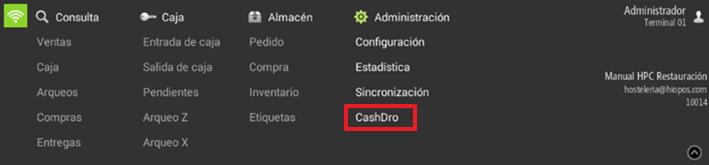
When the terminal synchronizes, a new functionality will appear in the Administration section: CashDroBy selecting it, we will connect directly with the device.
By connecting to CashDro, we can perform a multitude of operations, perform queries, configure the device itself, and log out (for authorized users).
Below is the CashDro screen when selecting the option from the HioPOS Cloud terminal. For more information regarding the operation of the cash manager itself, please consult manuals regarding its operation.
AI Assistant
Section summary
AI can generate inaccurate information; verify the results.