En esta sección
Barcode configuration for scale
HioPOS Cloud offers the possibility to configure the Barcode for Scales. To configure this functionality, the user must go to Settings, Barcode.
The user can modify the barcode prefix number for the scale and can configure the two barcode options.
There are two possibilities in barcode configuration, by Weight and by Price.
If we want to interpret a barcode that contains the weight of an item, we will configure the barcode to display the item's weight. In item settings, we will have had to enter a price per kilo that the application will retrieve and apply after reading the barcode. To configure it, we will select the weight button: "W" and

We will select the code fields that we want to be of this type.
If we want to interpret a barcode that contains the price of an item, we will configure the barcode to display the item's price. To configure it, we will select the price button: "P" and select the fields of the code that we want to be of this type.
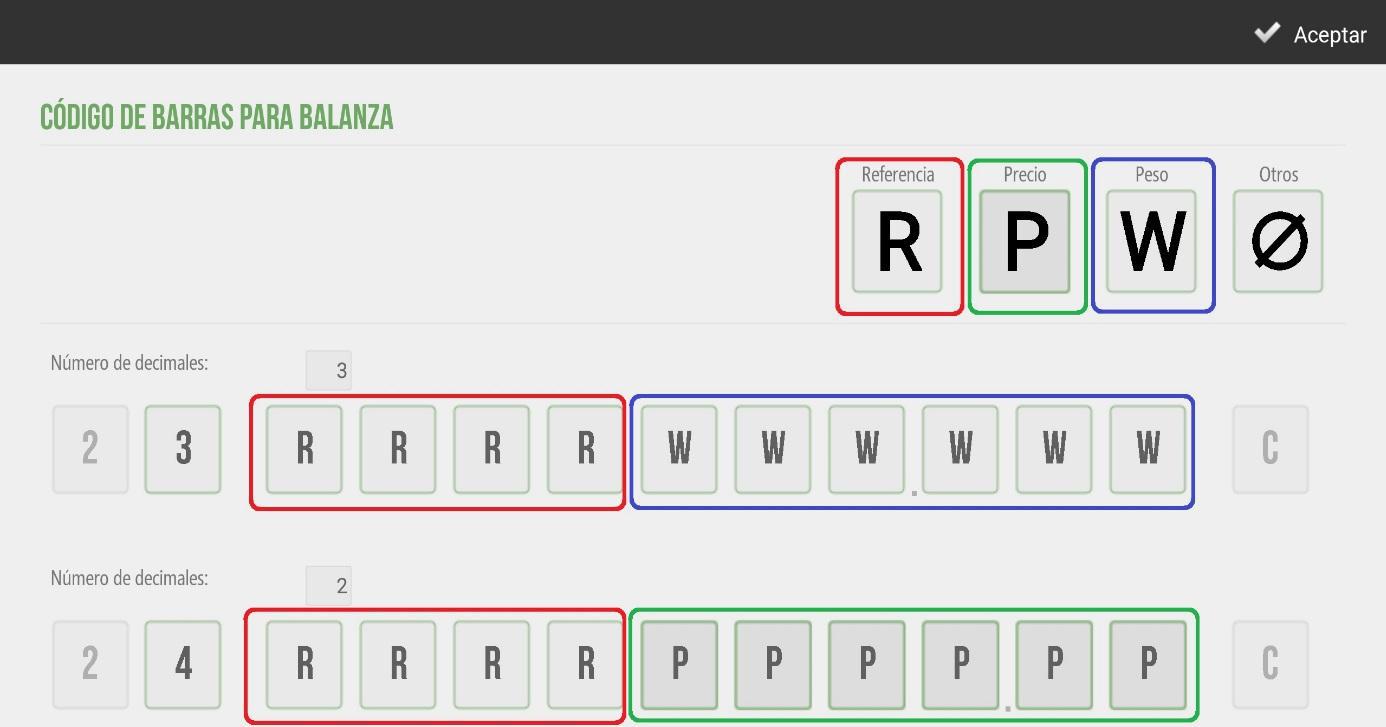
Below is the barcode screen for a scale. In our example, we have configured the first four digits and assigned them to the item reference. We have configured the number of decimals to 3 for the weight and to 2 for the price; this sets the decimal separator. The remaining six digits will be configured for the weight and price respectively, as shown.
AI Assistant
Section summary
AI can generate inaccurate information; verify the results.