En esta sección
Purchase forecast
Once sales are recorded, it is possible to maintain control of supply thanks to the forecasting tools found in the following tabs of the Purchase Orders module.
Sales since last purchase:
On this tab, you can view the latest purchases made by supplier and warehouse, along with the record of stock outflows since then. This function takes into account any stock outflow, such as sales, manufacturing, or warehouse transfers.

The table shows the units that have been issued as stock to ask for And if the record is selected and the button is checked Purchase order From the table header, an order is automatically generated with the units proposed in the column. To ask
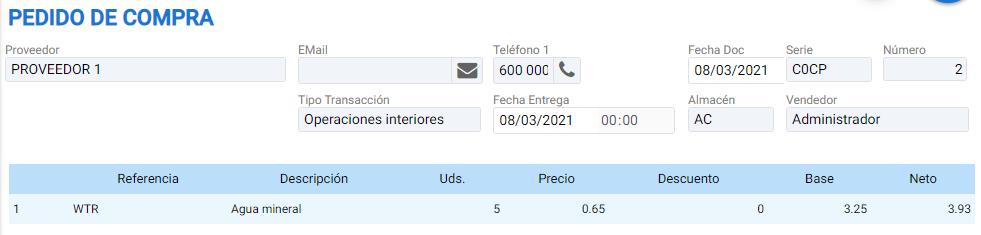
Items at a minimum:
The function of this option is to propose placing a purchase order for the maximum units allowed for the item as configured.
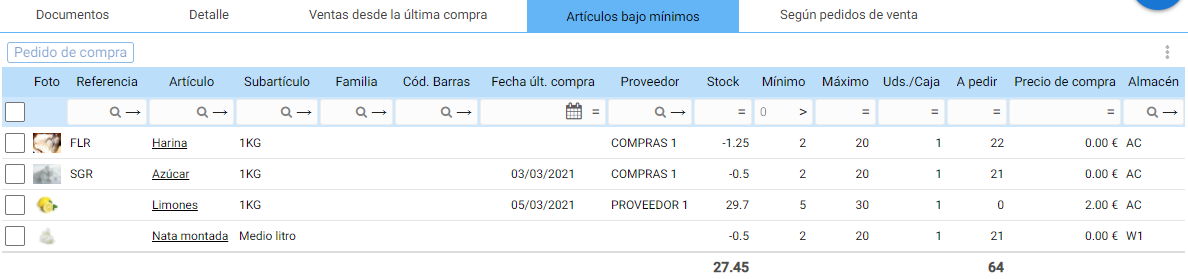
The table has the fields Minimum, Maximum, and You/Box which, in addition to being informative, can be modified from here. The 'To Order' column is recalculated based on what is entered in the Maximum section and the available stock units.
If you wish to order fewer units than the program proposes, it is also possible to modify them directly in the table before clicking the button. Purchase order from the head

If you want to order fewer units than those proposed by the program, it is also possible to modify them directly in the table before clicking the [Purchase Order] button in the header.

According to sales orders:
With the list of unfulfilled sales orders, one can access the sales order lines to forecast the stock that is pending delivery to customers.

The field To ask Proposes the units pending fulfillment from the selected sales order.
This function is very useful when storage space is not available and stock is purchased based on current demand.
AI Assistant
Section summary
AI can generate inaccurate information; verify the results.