En esta sección
Predefined Seats
Premium*
The Predefined Journal Entries module is a tool for creating the structure of a journal entry that is always posted against the same ledger accounts.
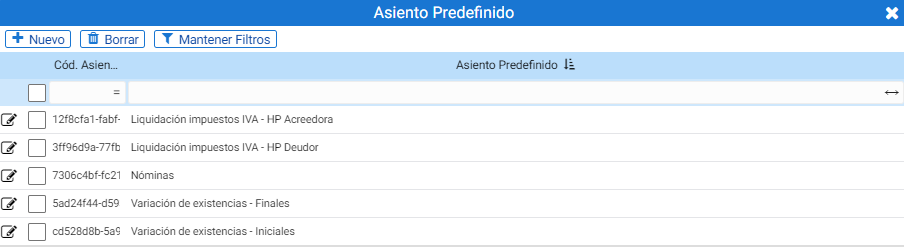
The possible predefined settings that the program provides by default are the following:
- VAT Settlement – (Public Treasury Creditor)
- VAT Tax Settlement – (Public Treasury Debtor)
- Payroll
- Inventory Variation – Final
- Stock Variation – Initial
The search tool itself contains the creation and deletion buttons for Predefined Entries.
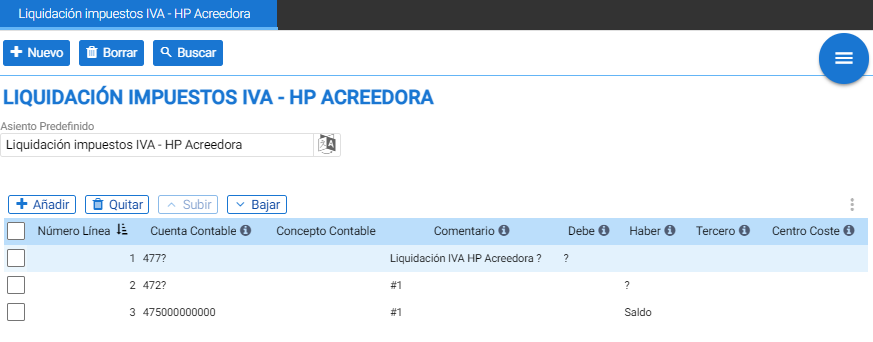
Upon accessing the maintenance form for one of the records, it can be edited: this form also contains the buttons for New, Delete and Search And below is the field to edit the name.
The table in the center of the screen contains the predefined seat structure.
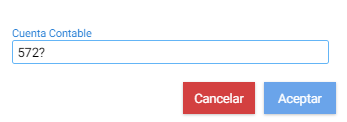
Upon clicking Add, a floating screen is displayed where you must indicate the accounting account code or the entry root. Using the question mark symbol leaves the root open so that once this predefined entry is used, it only needs to be completed with the sub-account code.
Then the entry must be completed with the comment. The first line of the entry must have a comment so that it can be automatically copied to the lines below, indicating in this field the hash symbol followed by the number one (#1).
If a question mark is added to the initial comment, the comment can be completed with any desired information when using this predefined entry.

The Debit and Credit fields allow three distinct types of values: the question mark, to leave the field empty for completion, to indicate a fixed amount, or to use the "Balance" instruction so that the calculated balance corresponding to the values indicated in the previous lines is automatically recorded.

To use a predefined entry, it is necessary to access the Journal. By clicking on the button Seats From the table header, a floating screen is displayed where you can select “Default Seat”.
AI Assistant
Section summary
AI can generate inaccurate information; verify the results.