En esta sección
Periodic Entries
Premium*
Recurring Entries are the automation of accounting entries over a defined period. They enable the recording of fixed revenues or expenses, such as a loan payment or the recurring collection for the same service.
Upon accessing this tool, a table is displayed that filters the various predefined entries that have been created by date and accounting firm.
A button of New allows creating a Predefined Entry; when clicked, a floating screen is displayed where you must indicate the accounting company, the start date for automatic entry generation, the time range (which can be annual, monthly, or daily), and the interval in years, months, or days that should exist between each record:
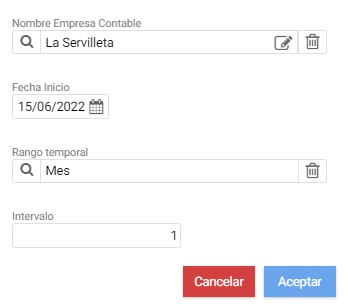
On pressing Accept The maintenance record for the journal entry is opened, where the accounting entries that comprise it must be indicated.
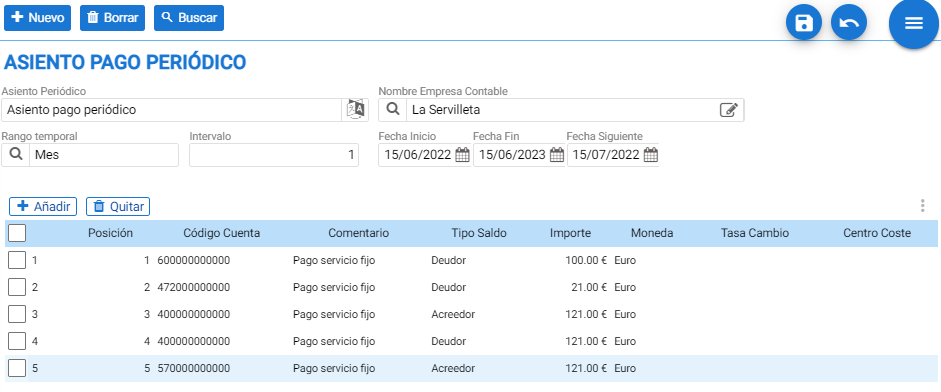
In the header, in addition to the search bar or the buttons for New y DeleteThere is the name of the new record and next to it, the accounting firm it should point to. The example in the image above is a monthly recurring payment of 100.00 gross euros that starts on June 15, 2022, and ends the following year.
To create the ledger entries, you must click the Add button in the table and select the accounting account to which the entry is assigned. Then, the program prompts you to indicate the Balance Type it corresponds to (simplifying, the Debtor balance type is for the one who has to pay, and Creditor for the one who collects it).


In the accounting entry creation table, the comment, the amount, and the currency must be indicated.
AI Assistant
Section summary
AI can generate inaccurate information; verify the results.