En esta sección
Availability
PortalRest allows you to configure the establishment's availability to streamline the processing of customer requests. By correctly configuring this screen, the application will automatically generate responses in cases where the establishment's availability does not match the customer's request.
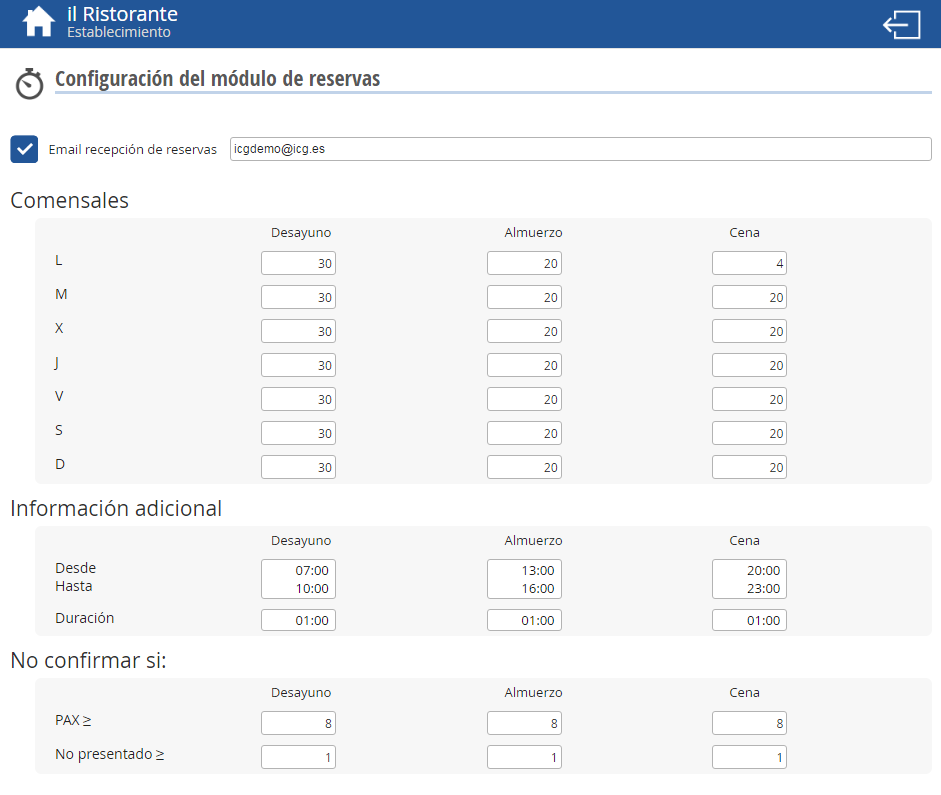
This screen allows you to specify the email address where you wish to receive customer reservations. In the 'Diners' section, you can configure the maximum number of diners that the establishment is willing to accommodate from PortalRest bookings.
As we can observe in the first line of the previous image, the number of diners can be different depending on: Breakfast – Lunch – Dinner but also depending on the day of the week.
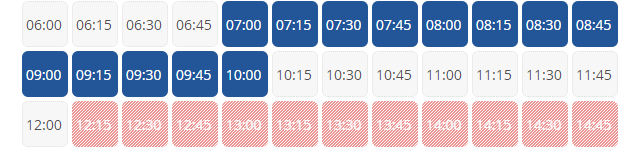
In the additional information section, we can configure the Breakfast, Lunch, and Dinner schedule using a selectable option. The chosen time will appear in blue, and times occupied by other meals will be marked in a different shade, as shown below.
We can configure our booking module, and we can set that a reservation is not confirmed if the number of diners (PAX) for it is greater than or equal to X and also if the number of no-show people is greater than or equal to Y, with X and Y being numbers chosen by us.
AI Assistant
Section summary
AI can generate inaccurate information; verify the results.