Settings and permissions
The Permissions user They determine what information each employee can view and what actions they can perform during cash counts.
In the Settings For the Store, predefined actions can be defined to perform during the Z-Reconciliation (cash closing).
In Type of terminal It will be determined whether or not the cash reconciliation can be performed with active sales or pending sales.
User Permissions
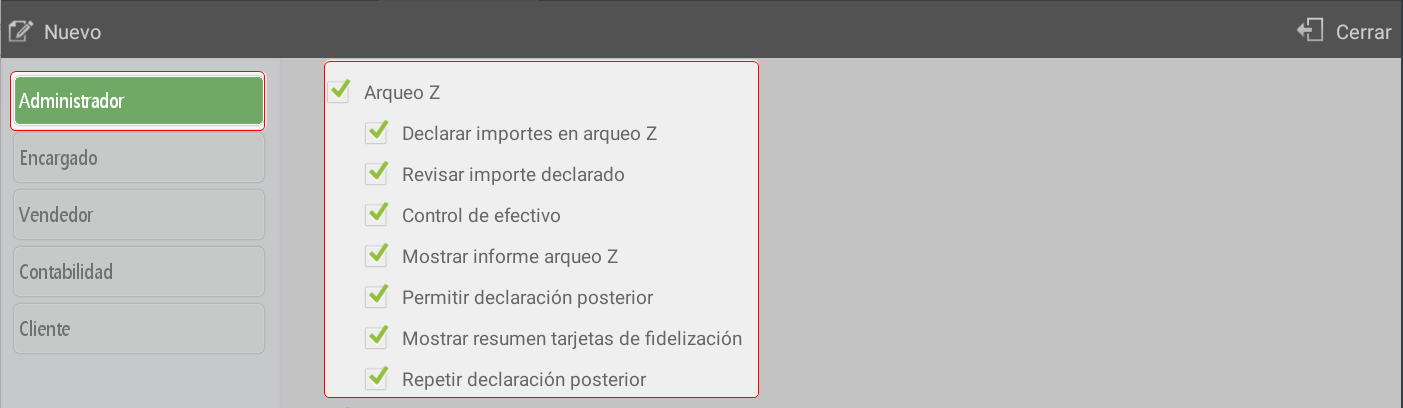
The user permissions determine what information each employee can consult according to the sales profile assigned to them and what actions they can perform in the cash reconciliations: consult declared amounts, access reconciliation reports, view loyalty card summaries, make or repeat subsequent declarations, or define if the Z-Reconciliation will be blind (without entering amounts) or editable (with the possibility of reviewing amounts).
Archaeology X
By seller (all the boxes): show only the amounts for sales made by the employee, in any terminal.
By seller (all boxes): show only the amounts for sales made by the employee, in any terminal.
See all sellers (all cashiers): shows all amounts recorded in all tills.
Show loyalty card summary: presents the breakdown of operations performed with this payment method.

Archaeology Z
Declare amounts on the Z-report:
Activated → the employee must declare the amounts for each payment method.
Deactivated → a is performed Blind count The closing completes automatically.
Review declared amount:
It allows the employee to compare the amounts calculated vs. declared, including possible differences (discrepancies).
It also activates a button Back To repeat the statement before completing the audit.
Requires having the options active Declare amounts y Cash control.
Cash control:
Show the differences between the calculated and declared amounts.
If the option Review declared amounts It is not enabled; the cash count can only be finalized without modifying amounts.
Allow subsequent declaration: enables re-entering the declaration amounts when consulting the cash reconciliation.
Show loyalty card summary: presents a summary of operations with these cards.
Repeat subsequent statement: when consulting the cash count, it allows re-entering the amounts already declared.
Settings
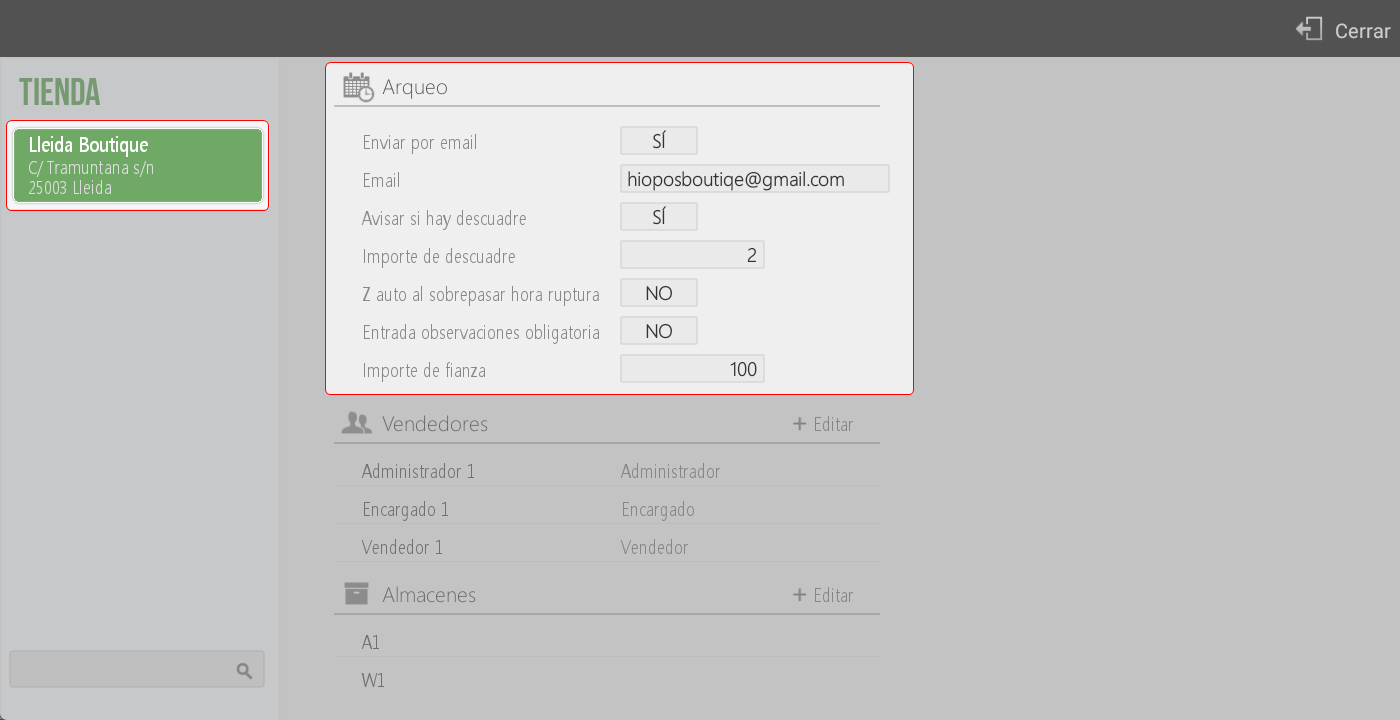
In Settings > Store The default parameters of the can be set Archaeological Survey Z.
The available options are:
Send by email: allows defining whether, upon completion of the cash counts, these will be automatically sent by email.
Email: address to which the cash count will be sent. If the option Send by email It is NO, this field will remain locked.
Let us know if there's a discrepancy: In case of discrepancy, the system will send an alert email.
In the matter The Z number, the establishment, and the till are indicated.
In the message body The discrepancy amount is detailed for each payment method.
Discrepancy amount: establishes the minimum amount from which the discrepancy notification will be sent.
Z automatically upon exceeding the cut-off time: sets the time when the Z-report will be automatically generated. This option is usually used in hospitality businesses.
Mandatory observation entry: requires the employee to enter comments when performing the Z-report.
Bond amount: enables setting a fixed value as a deposit for the next day. The rest of the cash from the cash count will be recorded as a withdrawal.
AI Assistant
Section summary
AI can generate inaccurate information; verify the results.