En esta sección
Configuration Terminal type
In the section Configuration, Ttype of terminal we will find several options to configure regarding the Type of business, Printing options, Pack modifiers, Tip, Timeout, Service charge

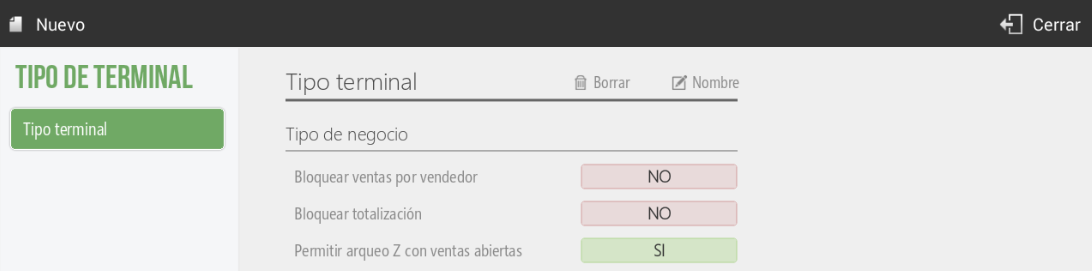
In the option of Type of businesswe can configure whether we want to block sales by salesperson, meaning that if a salesperson starts a sale, only they can access and finalize it. As for the totalization block, it indicates that terminals of this type cannot totalize sales. Finally, whether terminals with this configuration can perform Z-audits even with open sales.
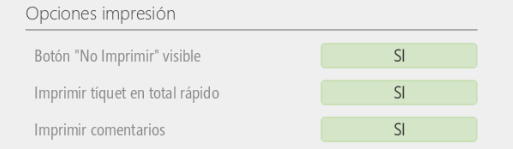
In the section Printing options, it's where we will select if the button Do not print Upon completing a sale, it will be visible or not; if we want to print the ticket in Total Rápido, that is to say, for the option to appear on the sales screen to Cash to finalize the quick sale. Also, it is selectable if we want to print the comments added to an item, using the receipt printer.
In the section Packs, Variants, we will enable the option so that when we select to sell a Pack, the variants of the items added to the activated price list appear.

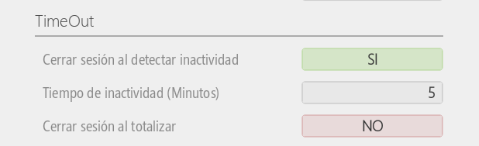
In the TimeOut section, we can select whether to close the active vendor's session upon detecting inactivity and specify the timeout duration. We can also choose to close the vendor's session and return to the vendor screen each time a sale is finalized.
As for the configuration of Tip and Service charge, are explained in sections 2.8.1 and 2.8.2, respectively.
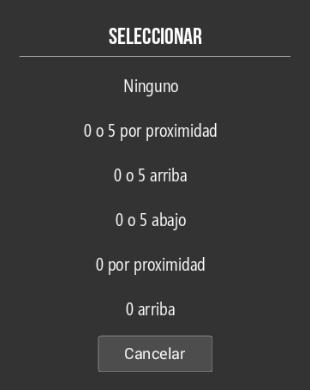
Finally, you can decide how to round the last digit on the sales ticket, choosing from the following options:

AI Assistant
Section summary
AI can generate inaccurate information; verify the results.