En esta sección
Article editing
When we access the section Configuration Items, the following screen opens. From here, you can change the name of the selected family as well as delete it. It should be noted that a family with items inside cannot be deleted, so if you want to delete a family, you must first delete all the items it includes.
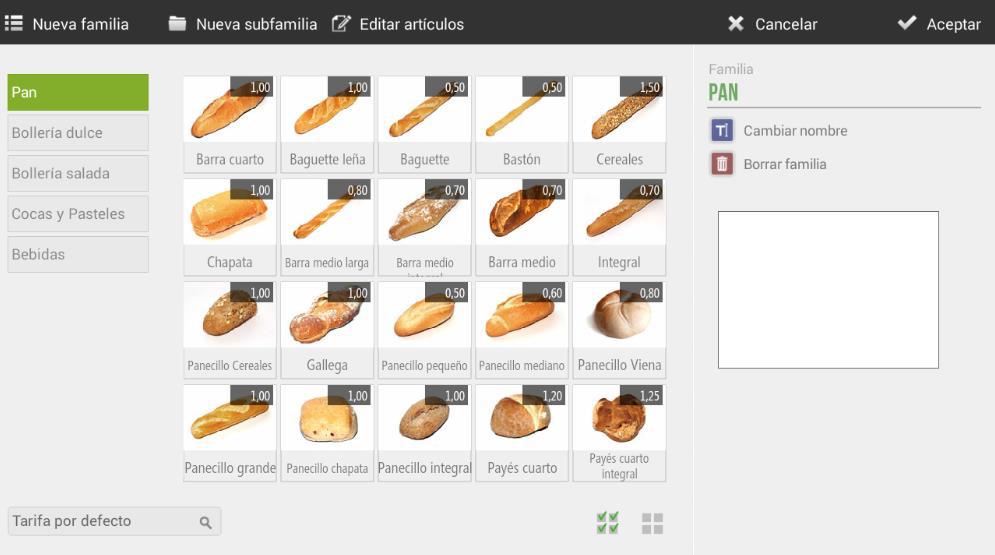
In the white box that appears on the right margin of the screen, you will be able to select a
image for the family.
This image will not be reflected in the POS, but it would be if one had a
Terminal configured as Kiosk or Electronic Menu version.
Clicking on an item will open the following options related to that item:
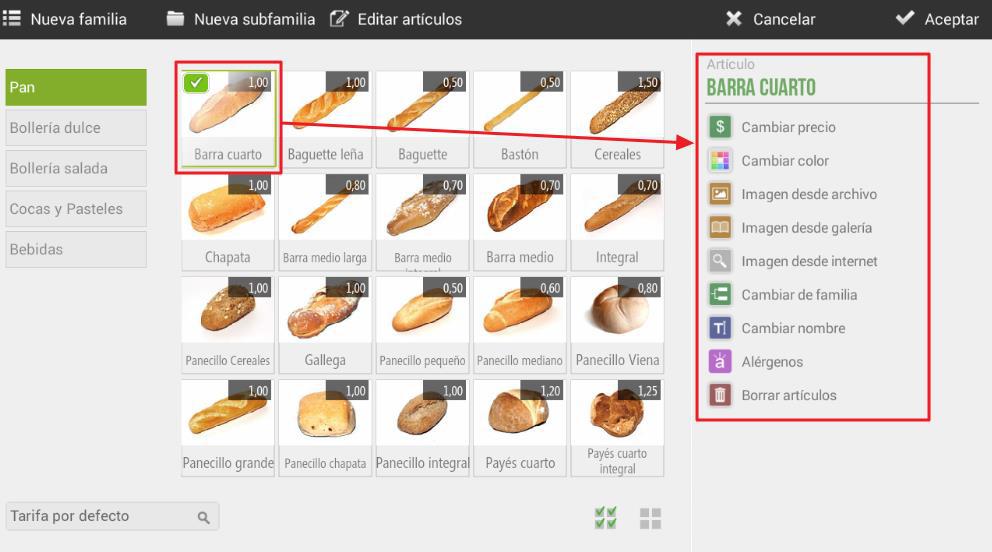
- Change price: allows manually changing the price of the selected item.
- Change color : this option changes the color of the item, whether it has another color or a
image
- Image from archive : you can add an image by searching for it within the system itself
- Image from gallery : you can add an image from the gallery depending on the type of
business, which ICG makes available to clients.
- Image from the internet : this option allows you to search for an image directly from the
terminal's default browser. Upon selection, the internet page will open with the
item name. To select any of the photos, a long-press must be performed.
about the desired image.
- Changing families : allows changing the category of the selected item. A pop-up will open
Meet with all the families to select the desired one.
- Rename : allows changing the name of the article.
- Allergens: allows to indicate the different allergens corresponding to the item.
- Delete article : allows omitting the article.
AI Assistant
Section summary
AI can generate inaccurate information; verify the results.